From GitHub Specs to Product Experience
Product Design
UX Audit
User flow mapping
Landing page
European Logistics
How I translated technical requirements into user journeys, identify missing scenarios, and define how users would interact with the product.
ROLE
Sole Product Designer
DURATION
4 months
TEAM
Product Owner · PM · Frontend & Backend Engineers
GitHub Specs → Product UX
Translated technical documentation into complete user journeys.
Accelerated Design Delivery
Reused an existing design system to speed up mid-fidelity design and prototyping.
Complete Product Flows
Defined missing screens, edge cases, and interaction patterns.
Scalable UI Foundation
Built reusable components and unified patterns.

THE CHALLENGE
The product existed as a technical specification rather than a user experience.
No existing wireframes, design system, or visual language. Before designing interfaces, I first had to understand an unfamiliar logistics domain, translate technical requirements into user journeys, identify missing scenarios, and define how users would interact with the product. The challenge wasn't just designing screens—it was turning technical documentation into a usable product experience.

Spec file
WHAT I DID
Understanding the documentation and translating it to design
I began by understanding the GitHub documentation and translating the technical requirements into a clear product structure and sitemap. Using the existing Snap&Go design system, I created mid-fidelity wireframes before refining them into polished interfaces.
Throughout the process, I benchmarked leading products, researched unfamiliar features, and collaborated closely with the lead developer to ensure technical feasibility. The designs were continuously iterated as requirements evolved until they were ready for development.
01
Understand & Structure the Product
Reviewed the GitHub specification and organized technical requirements into logical, task-based user flows before designing interfaces.
02
Complete the Core User Flows
Designed the screens required for each journey, filling flow gaps and connecting fragmented interactions into complete end-to-end experiences.
03
Design States & Edge Cases
Defined loading, empty, error, success, and alternative states to ensure every user action had a clear and consistent response.
04
Fill Product Gaps
Identified and designed essential experiences missing from the specification—including onboarding, home, profile, earnings, and other supporting screens—to create a complete MVP.
05
Review, Validate & Iterate
Presented designs for stakeholder feedback, refined flows, and continuously iterated to improve usability and align with business requirements.
SAMPLE SPEC TO FLOW
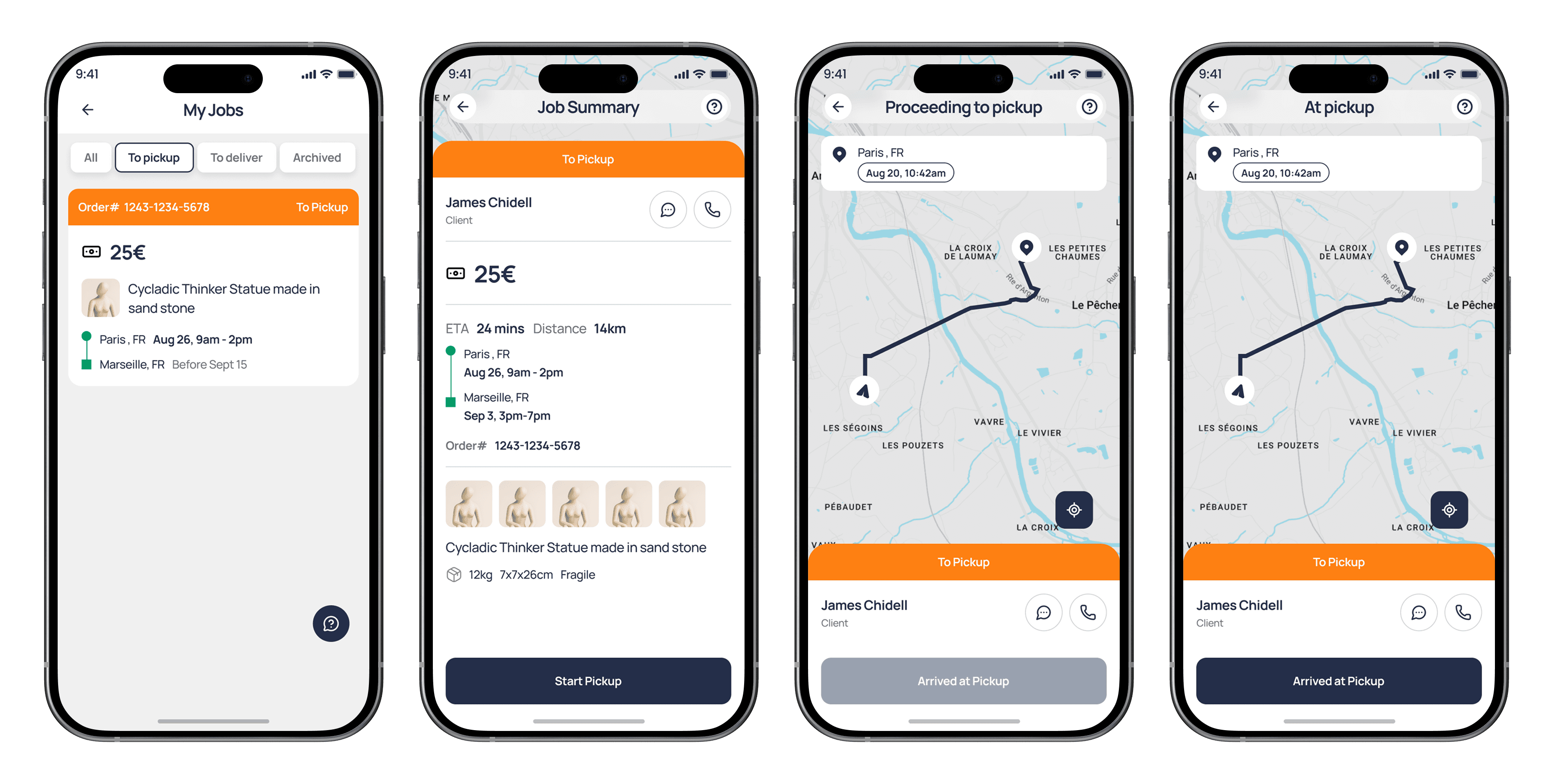
4 Bullets to 1 complete flow
Below is the original flow specification from the GitHub Markdown file—the only source of requirements available for this feature. No accompanying designs or additional documentation were provided.
Acceptance Flow
One-tap acceptance (first-come-first-served)
Immediate confirmation
Job moves from available to "My Jobs"
Cancellation allowed with potential fees

Continuing the process above I covered around a total of 150 screens.


Beyond the MVP
The MVP need a landing page for its launch. I designed and developed it solo in framer. I collaborated with the developers for the quote form integration. The result? A fully responsive landing page with CMS built for their covered areas, item types and platforms they partnered with.
Trade-offs
Product Before Polish
The app launched with a mid-fidelity UI to meet deadlines. I prioritized complete user flows, features, and usability over refining the visual system.
Speed Over Visual Uniqueness
The website used reusable page templates to launch faster. I focused on key content, functional forms, and essential pages instead of creating unique layouts for every screen.
Outcomes
Starting with nothing more than a GitHub Markdown specification, I transformed fragmented technical requirements into a complete product experience that truckers can use in their daily workflow.
Translated technical specs into intuitive user journeys and mobile screens.
Designed real-time order management for receiving and tracking delivery requests.
Enabled schedule proposals so drivers can suggest alternative pickup or delivery dates.
Created payment & earnings flows for tracking payouts and completed jobs.
Filled UX gaps with onboarding, home, profile, notifications, and supporting screens.
Handled edge cases with loading, empty, error, and success states.
Delivered a production-ready UX from a vague, bullet-point specification.
Result: A complete logistics app that bridges the gap between engineering requirements and a practical, easy-to-use experience for truckers.

Key Learning
This project reinforced that successful product design isn't about waiting for perfect requirements—it's about uncovering what's missing and turning ambiguity into clarity.
Takeaway
Great product design isn't just executing requirements—it's identifying what's missing and creating the experience users actually need.

